
Tile sheets and tilemaps
A tile sheet is not a picture. Your engine cuts it into cells and places each one next to cells it never touched in the sheet. Tile grid solves each cell the way it will be used, so any tile meets any other without a seam. New in 1.4.0.
Why a sheet solved as one picture shows seams
The solver treats every connected patch of opaque pixels as one object, and treats the edge of that patch as its outline, where the surface curves away out of sight. That is exactly right for a character and wrong for a tile sheet, in three ways:
- Tiles packed against each other are smoothed together. A grass strip drawn on top of a block of fill is solved as one surface with it. In your level, that strip sits next to entirely different tiles.
- Flat fill that ends on a tile line becomes an outline. Where the sheet happens to be transparent past a tile's edge, the edge is lit as though the ground curved away there. Every place that tile is used gets a hard line in the lighting.
- A grass top packed under another piece loses its lip. The piece above hides it, so it is not an outline at all, while the same grass on a strip with space above it rolls over properly.
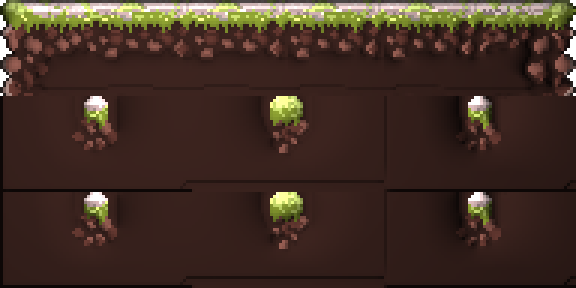 The sheet solved as one pictureFill that ended against transparency in the sheet is lit as an edge, and every copy carries the line.
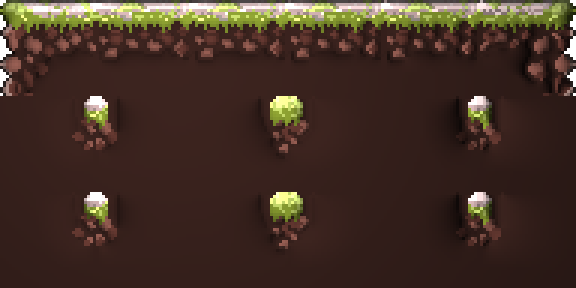 Tile grid on, tops markedThe same settings and hints. Each tile is solved on its own, and its edges meet level.
Don't space your tiles apart
It is tempting to leave a pixel of space between tiles. That makes things worse. Every tile becomes a separate shape, so every flat edge becomes an outline and curves away, and the sheet solves as a grid of pillows. On a typical sheet, most of the edges where art runs flush to a tile line touch another tile, and space would turn each of them into a seam.
Solve each tile on its own instead. If your sheet already has space between tiles, that is fine too: set Padding to match, and the space belongs to no tile.
Setting up the grid
In the Solver tab, tick Tile grid and enter the numbers you gave Unity's Sprite Editor under Slice ▸ Grid By Cell Size. They are the same fields, in the same order:
| Setting | Unity's field | What it is |
|---|---|---|
| Tile width, Tile height | Pixel Size | The size of one cell. |
| Offset X, Offset Y | Offset | Where the first cell starts, from the top-left corner. |
| Padding X, Padding Y | Padding | The gap between neighboring cells. |
The viewport draws the cells while hints are showing. With the grid on, each cell is solved as if it were its own image:
- A tile depends only on its own pixels and hints. Nothing packed beside it in the sheet reaches it.
- A tile's edges are held level across the tile line where the art carries on into the next tile. Level ground is the one thing every possible neighbor agrees with, so any two tiles meet cleanly. It is level on the tile line itself, not on the pixels either side of it, so a slope that crosses the line, like a roof's peak, runs straight through it. The tilt along the line is left to the art, so a grass lip or a shadowed band that runs across tiles runs straight through too.
- Outlines inside a tile still curve away. A rounded rock border that has transparency within the cell is a real outline and is treated as one.
Marking walkable tops: Outline edge
There is one thing the grid cannot tell from the pixels. A flat edge sitting exactly on a tile line might be the top of the ground, where the grass stops against the sky, or fill that carries on into the tile below. The grid assumes it carries on, because getting that wrong the other way puts a line at every seam.
Tell it where the art really stops with Outline edge G. Paint it on the edge pixels themselves — along the top row of a platform, a ledge, a grass strip — and that edge rolls away like any other outline.
Paint it all the way to the corners, with any size of brush. An edge opens only where your paint runs along it further than it reaches into the tile. A stroke across the top that reaches the corner rolls the top over there without curling the side, even when the brush also covers the first few pixels down each side, and the lip meets the next tile's lip. A band painted along a roof's slope opens only the slope, not the tile edges it crosses under the peak and above the eaves. Stopping short leaves the last few pixels unmarked, which shows as a dip in the lip at every tile line.
Paint stays in the tile where the stroke started, with every tool, so a brush wide enough to be easy to use will not spill onto the bottom edge of the tile above. Outline edge painted anywhere but an edge pixel does nothing, and the application says so, as it does for a cut painted inside the shape.
It works without a grid too. A sprite cropped tight to its art, with feet or a hat touching the canvas edge, has the same problem at the canvas border, and the same fix.
What else changes with the grid on
- The status bar says Tiles. Tiles are solved on the CPU, one at a time, and only the tiles you changed are solved again. That is faster than it sounds: a 512×288 sheet of 32-pixel tiles solves in about a third of a second, and a brush stroke in one tile re-solves in about fifteen milliseconds.
- Height and ambient occlusion are per tile, on one shared scale, so a neighbor in the sheet never shades a tile and a tile of flat fill stays flat. Specular reads the whole sheet's brightness, as before.
- Some things are still measured across the whole sheet, because measuring them per tile would make neighbors disagree: how dark a line must be to count as a line, whether a painted Flatten region switches off Flatten interior, and where Trust methods lets the detail methods speak.
- Pixels in the padding, or before the offset, belong to no tile and export facing the camera.
The grid is saved with a project and a preset, and the batch tool takes it as --tile-width and --tile-height. See
Batch and the command line.
In Unity
Export for Unity as usual and assign the normal map as the sheet's _NormalMap secondary texture. See
Exporting. The secondary texture shares the sheet's slicing, so there is nothing to slice twice.
If you still see a line between tiles, check whether it is in the colour as well as the lighting. A line in both is the texture sampling across into the neighboring cell, which the normal map cannot fix: for pixel art that means Filter Mode: Point, Compression: None, and no mip maps, on the sheet and on its normal map alike.